
7.2 Mini Game (迷你游戏)
Description (说明)
This page example shows how operators can load HrgSdk to quickly build mini-game features (Menu + Game).
此页面示例营运商载入 HrgSdk 快速建置 迷你游戏功能 (Menu + 游戏本体)
Demo (示例)
The image displays the Menu (bottom right) and the Game (center).
图片中展示了 Menu(右下) 与 游戏本体(中间)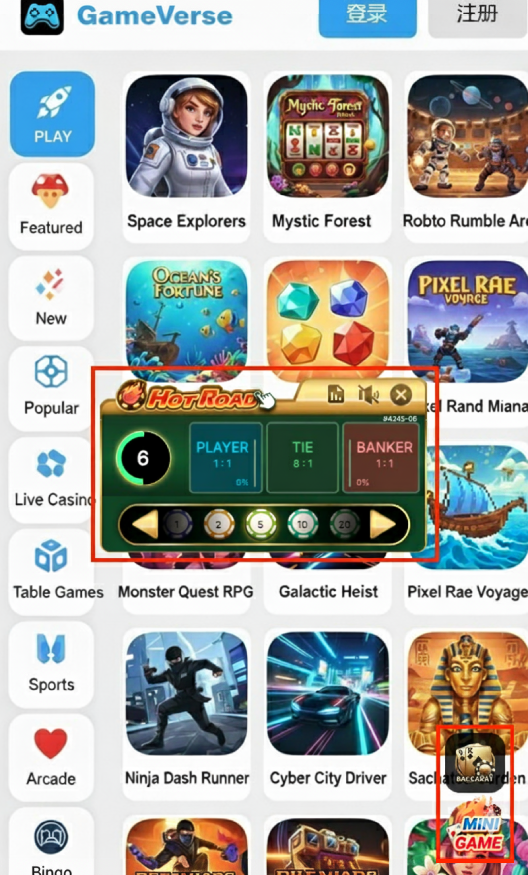
调用 HrgSdk 產生Mini Game Menu
Our company has integrated HrgSdk for you to quickly build Menu buttons. In different frontend frameworks (e.g., Vue, React), you can securely import HrgSdk and quickly generate HRG Mini Game Menu.
我司整合了 HrgSdk,供您快速建置 Menu按钮,在不同的前端框架(如 Vue, React)中,安全地引入 HrgSdk ,并快速生成HRG Mini Game Menu。
运作原理
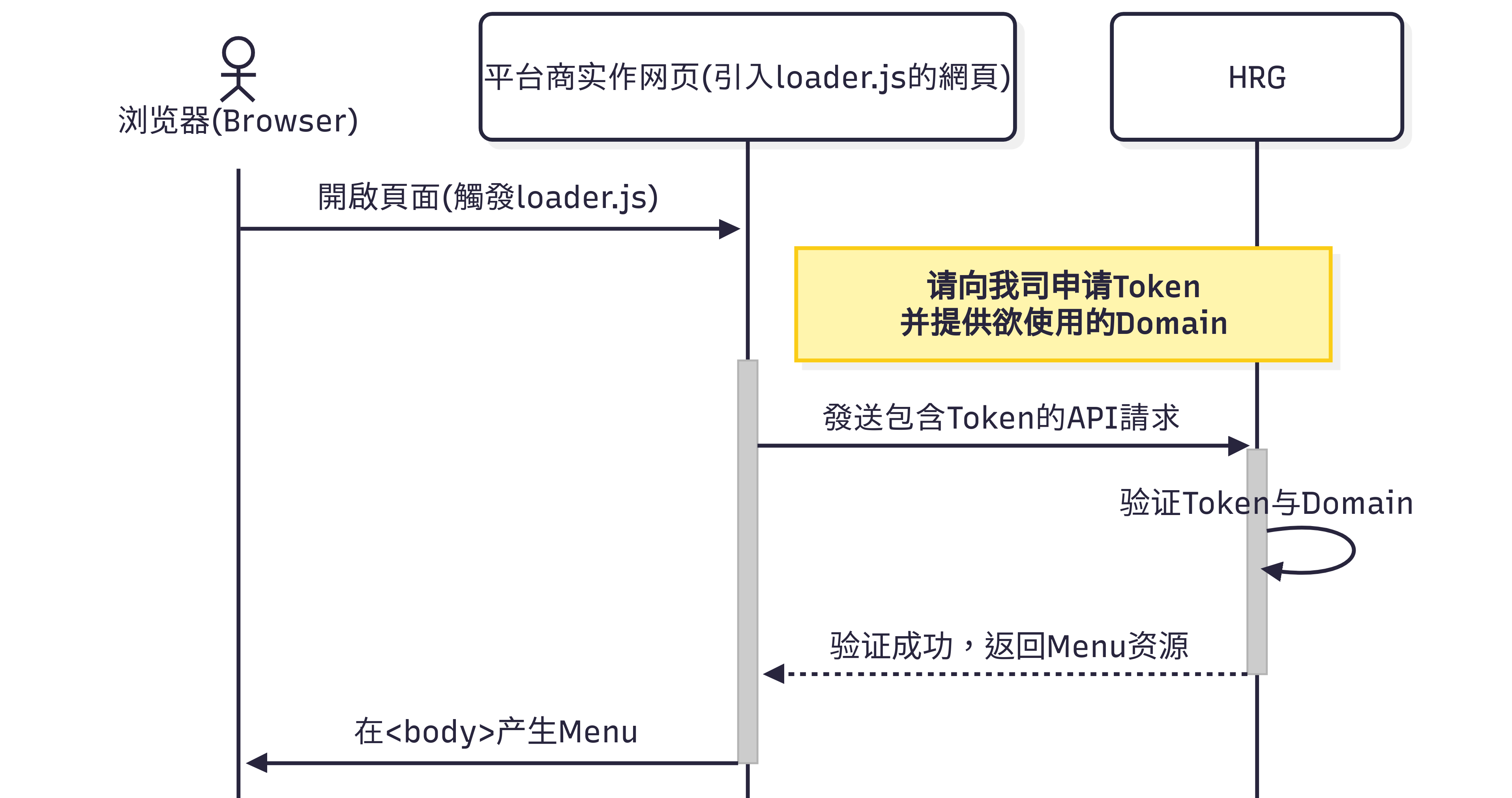
注意事项
Please apply for a token from our company first and provide the required domain whitelist for HrgSdk authentication.
Please provide the domain according to the following format
请先向我司申请 token,并提供所需使用的domain白名单,用于HrgSdk身份验证
请根据以下格式提供domain
| Domain format | Domain example |
|---|---|
| {{protocol}}://{{your-domain}} | https://example.com |
使用方法
Step 1 Obtain Credentials: Request a token from our company and provide the domain.Step 2 Load Script: Dynamically load <script src="https://{{host}}/mini-game/loader.js"></script> into the page.Step 3 Call createMiniGame(): After the script is loaded, securely call the HrgSdk.createMiniGame() method, passing in the token and async function().
步骤1 获取凭证:向我司请求token,并提供domain给我司。步骤2 载入脚本:将 <script src="https://{{host}}/mini-game/loader.js"></script> 动态载入到页面中。步骤3 呼叫createMiniGame():在脚本载入完成后,安全地呼叫 HrgSdk.createMiniGame() 方法,并带入token与async function()。
HrgSdk Function (HrgSdk 功能)
.createMiniGame()
Description(说明):
Generate Mini Game Menu in <body>
在<body>产生 Mini Game Menu
Configuration Structure (配置结构):
| Parameter | Type | Return | Description |
|---|---|---|---|
| token | string | The token provided to you by our company.我司提供给贵司的 token | |
| launchGameUrl | function | string | Implement an async function to request a game URL. It should accept {gameType, gameCode} as parameters and return the game URL as a string. Refer to our API documentation for details: 3.2 Launch Game实作 async函式,用于请求游戏 URL,接收{gameType, gameCode}作为参数,并应返回游戏的 URL 字串,参考我司API 3.2 取得进入游戏网址 |
| x(px) | number | menu default x position(px) menu预设x轴位置(px) | |
| y(px) | number | menu default y position(px) menu预设y轴位置(px) |
Configuration Example (配置示例):
HrgSdk.createMiniGame({
    // 我司提供给贵司的token
    token: 'abcdef12345',
    // 实作 async function
    launchGameUrl: async ({gameType, gameCode}) => await getLaunchGameUrl(gameType, gameCode),
    x: 500, // menu预设x轴位置(px)
    y: 500  // menu预设y轴位置(px)
});